
Shopify Order Management System (OMS) for Made-to-Order
For made-to-order Shopify shops, order management means a production queue: line-item properties, stages, ship-by. Native vs OMS vs queue, with honest limits.
Who this is for
Shopify merchants who:
- Sell made-to-order products such as jewelry with engraving, embroidered goods, custom apparel, signs, furniture, or personalized gifts.
- Need one list of orders with line items, customer-selected options, and order notes — without opening every order.
- Run production in more than one stage (for example Designing, Cutting, Engraving).
- Need to prioritize work by shipping deadlines.
- Sell on more than one platform (for example Etsy and Faire) but sync those orders into Shopify.
Who this is not for
Shopify merchants whose main need is an omni-channel order management system or inventory system that syncs stock across locations, manages bins, and handles stock transfers. That is a warehouse OMS. This guide still explains that category so you can tell it apart from a production queue.
This article is the decision guide on:
- The software categories that all get called “order management.”
- When to choose a warehouse / multi-channel OMS, manufacturing / MRP, a production queue, or a combination — with one clear rule for who owns stages.
Short answer
If you sell stocked products and Shopify Admin already answers “what ships today,” stay on native Shopify (Orders, tags, Flow). You do not need another OMS.
Pick by the morning problem, not by the word “OMS”:
If the pain is inventory across warehouses, 3PLs, bins, and stock transfers — you need a warehouse / multi-channel OMS (Cin7, Linnworks, Brightpearl).
If the pain is materials, recipes, BOMs, and “can we promise this date given components?” — you need manufacturing / MRP (Katana, Stocksmith, Orderkraft).
If the pain is opening every Shopify order to see line items, customizations, production stage, and what ships first — you need a production queue. Orderline is one: its own orders board beside Shopify.
If you have two pains at once — use a combination, and keep one system of record for factory stages. Warehouse OMS or MRP owns stock or materials (and manufacturing stages, if you use them). Orderline owns the Shopify fulfillment list (options, ship-by, packing, fulfill) once the order is in Shopify. Do not run the same Cutting → Engraving board in two apps.
How to decide whether you need a warehouse / multi-channel OMS, manufacturing / MRP, or a production queue
Here is a comparison by job, not a ranked “best OMS” list.
| Type | Job | Who belongs |
|---|---|---|
| Native Shopify | Paid → fulfill, tags, notes, locations | Shopify Admin Orders; tags + Shopify Flow |
| Warehouse / multi-channel OMS | Inventory, 3PLs, bins, routing, stock transfers | Cin7, Linnworks, Brightpearl |
| Manufacturing / MRP | BOM, materials, recipes, capacity, manufacturing orders | Katana, Stocksmith, Orderkraft |
| Production queue | See customizations, stages, and ship-by without opening every order, print packing slips and fulfil orders | Orderline, FlowDeck |
| Combination | Stock or materials and a Shopify fulfillment list | OMS or MRP for stock/materials (and factory stages); production queue for the Shopify list — not two stage boards |
When is native Shopify enough?
Native Shopify order management is Admin Orders, payments, tags, notes, locations, and fulfillment. It is already paid for with your Shopify plan.
It fits well when products are mostly stocked (ready to ship), every order looks similar, and “Unfulfilled” is enough as a status. Tags and Shopify Flow can stretch that a little.
It is usually not enough when every order has unique options you must read before you make or pack, or when Unfulfilled / Fulfilled cannot describe Designing → Cutting → Engraving.
That extra work is mostly opening orders. Native Admin is not wrong — it just was not built to show engraving text on the list. If you already live in that click loop, the hours add up even when each click feels small. (yes, we actually did the math)
How much does opening every order actually cost?
This is a back-of-the-envelope estimate, not a survey of shops. Use your own order count and seconds.
Suppose you review about 40 unfulfilled orders on a typical day, spend about 45 seconds extra on each one just opening it to scan personalization, and you do that five days a week. That is 40 × 45 × 5 = 9,000 seconds — roughly two and a half hours a week.
At 20 orders a day, the same assumptions land near an hour and a quarter. At 60, near three and three-quarter hours. Change the seconds or the order count for your shop; the formula is what matters.
Wrong engravings and late ships usually cost more than the stopwatch. This chart is only the click-through time.
If this looks like your week, native Shopify is still the right checkout and payment system — the gap is the list. That is the production-queue category later in this guide, not a reason to buy warehouse OMS or MRP.
When do you need manufacturing / MRP software?
Manufacturing / MRP software is for shops where what you make is built from parts — wax and fragrance, timber and screws, fabric and blanks — and those parts need their own inventory, recipes, and purchasing. Shopify is very good at selling a finished product. It is less helpful when one sale should quietly use up several ingredients.
What are some use cases where manufacturing / MRP software fits well?
A candle and soap maker. Each SKU is a recipe: wax, fragrance, dye, vessel, wick. Shopify shows “Vanilla 8oz — 12 left.” It does not show that those 12 jars share a drum of fragrance with three other scents, or what one candle cost to make after last month’s wax price change. At tax time or when setting wholesale, you want a bill of materials, batch or lot codes if you need them, and a true unit cost. That is MRP (or maker inventory software in the same family).
A furniture workshop. A customer orders a dining table and six chairs. In Shopify that can look like two line items. On the floor it is shared timber, hardware, finish, and several days of work. If oak is short, you may not be able to promise Friday — even though the table SKU still shows in stock. MRP keeps a bill of materials and a manufacturing order so purchasing and promise dates follow the parts, not only the finished listing.
Which MRP tools work with Shopify?
These are well-known manufacturing / MRP tools that work with Shopify, with App Store ratings and prices as of 10 September 2026. They are examples of the category, not a “top rated” ranking (Orderkraft had no reviews on that date). Please re-check each listing before you subscribe — plans and add-ons change.
| App | Where it lives | App Store rating | Published price | Best when |
|---|---|---|---|---|
| Stocksmith (Craftybase) | Shopify app + maker inventory | 4.4 (31 reviews) | From $24/month (14-day trial). Tiers $24 / $49 / $99 / $199; two-way stock sync from $99 | Small-batch recipes, COGS, materials, Shopify/Etsy-style makers |
| Katana Cloud Inventory | Full MRP; Shopify integration | 4.2 (131 reviews) | Free (30 SKUs). Core from $299/month + usage (orders, locations) and paid add-ons | Inventory + purchasing + manufacturing as the system of record |
| Orderkraft | Shopify app (work orders) | No reviews yet (0) | $29/month + per completed-order usage (14-day trial). Usage starts at $0.75 per order, falling in volume tiers | MTO work orders, BOMs, product-page lead times — still a new listing, so a trial is wise |
Longer comparisons: Orderline vs Katana, vs Stocksmith, vs Orderkraft.
Can you use MRP software with Orderline?
Yes, if you split the jobs. MRP owns materials (reordering, forecasting, bills of materials) and factory stages if your production team works there. Orderline owns the Shopify fulfillment list: customer-selected options, ship-by dates, line items, packing slips, and fulfill.
Do not copy the same production stages into both. If Cutting → Polishing already lives in the MRP, leave Orderline for packing and ship-by — or skip Orderline if the MRP already covers that list.
When do you need a warehouse / multi-channel OMS?
A warehouse / multi-channel OMS is for shops where stock is the hard problem: the same SKU lives in more than one place, sells on more than one channel, and must stay in sync so you do not oversell. Shopify can hold locations and channel orders. It gets stretched when you add 3PLs, bins, stock transfers, wholesale, and Amazon or eBay as first-class inventory.
Selling on Etsy or Faire and copying those orders into Shopify is ingest, not a warehouse OMS. A warehouse OMS is the step up when Shopify is no longer the system of record for where the units are.
What are some use cases where a warehouse / multi-channel OMS fits well?
A brand that sells the same finished SKU on Shopify, Amazon, and wholesale. One hoodie in three places. If Amazon sells the last unit and Shopify still shows it in stock, you have an oversell. A warehouse OMS keeps one inventory number across channels, routes the order to the right warehouse or 3PL, and often talks to accounting (Xero, QuickBooks) so purchases and sales match. The morning problem is “did we sell stock we do not have?” — not “what did the customer engrave?”
A shop with more than one warehouse, bins, or a 3PL. Goods move between a packing room, a bulk warehouse, and a fulfillment partner. You need transfers, bin locations, and “pick from the closest warehouse.” Shopify locations help at a basic level. An OMS (or WMS sitting with it) is built for that motion. Custom furniture or jewelry made to order can still live in Shopify; the OMS is for the stocked SKUs that travel through the network.
Which warehouse / multi-channel OMS tools work with Shopify?
These are the warehouse / multi-channel names in the table above, with App Store ratings and prices as of 10 September 2026. Several listings are connectors — the real subscription is billed by the vendor. Ratings with very few reviews (for example Linnworks) are not a “top rated” shortlist. Please re-check before you subscribe.
| App | Where it lives | App Store rating | Published price | Best when |
|---|---|---|---|---|
| Cin7 Core | Inventory + order platform; Shopify app | 4.3 (61 reviews) | From $349/month (14-day trial). App Store: Standard $349 / Pro $599 / Advanced $1,199; extra users and integrations may add cost. Omni is a separate quote | Multi-location stock, purchase orders, higher volume, accounting integrations |
| Linnworks | Omnichannel inventory and order routing | 4.1 (3 reviews) | Free to install; price on request (demo / sales). The Shopify listing is a connector | Many sales channels, automated routing, warehouse + marketplace ops |
| Brightpearl by Sage | Retail operations (orders, inventory, warehouse, accounting) | 4.6 (56 reviews) | Shopify listing shows a free connector; platform price is not published — you request a quote | Mid-market retail / wholesale who want inventory and finance in one back office |
Longer comparison: Orderline vs Cin7.
Can you use a warehouse / multi-channel OMS with Orderline?
Yes, with the same split. The OMS owns inventory in and out, stock takes, and syncing stock to channels such as Amazon, Etsy, and Faire.
Once the order is in Shopify, Orderline can help fulfillment staff see which items to ship and when. The OMS should not and Orderline should not both be the factory stage board.
When do you need a production queue for order management?
A production queue fits when the daily problem is the Shopify order list: unique options on each line, more than two statuses, and a need to see what is due without opening every order. FlowDeck is another app in this lane. The rest of this section shows how Orderline does that job.
A jewelry or gift shop. Every necklace has different engraving text. Staff currently open each order in Admin to read it. A production queue puts image, options, and ship-by on one list.
A print or furniture shop with stages, but not a full MRP. Work moves Designing → Cutting → Engraving, and Shopify only offers Unfulfilled. If you are not yet tracking timber or ink as a bill of materials, a queue is usually enough. If the floor already runs those stages in Katana or similar, use that for stages and only add a queue if the Shopify list is still blind to options.
Here is the Orderline orders screen:
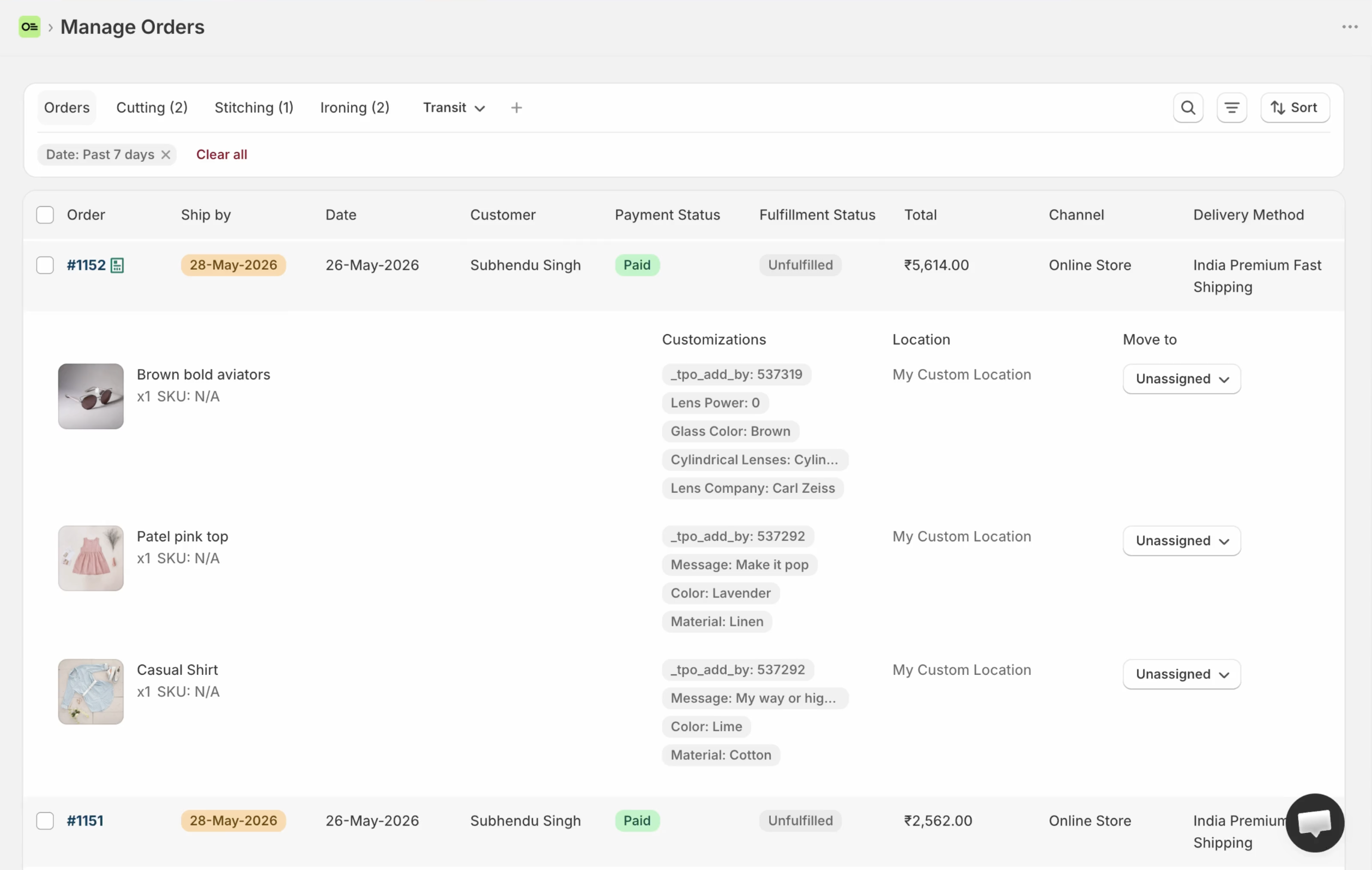
This screen has the information fulfillment staff need at a glance, without opening an order.
Orderline’s production queue is built to answer three questions:
What to make?
Each order’s line items show customer-selected options, a product image, SKU, and quantity.
Which stage is each line item in?
Your flow may look like Designing → Cutting → Polishing → Engraving. You can move the whole order or a single line item. For example, on an order of one dining table and six chairs, the chairs can be in Polishing while the table is in Cutting.
Use these stages in Orderline only if they are not already the system of record in an MRP.
What leaves when?
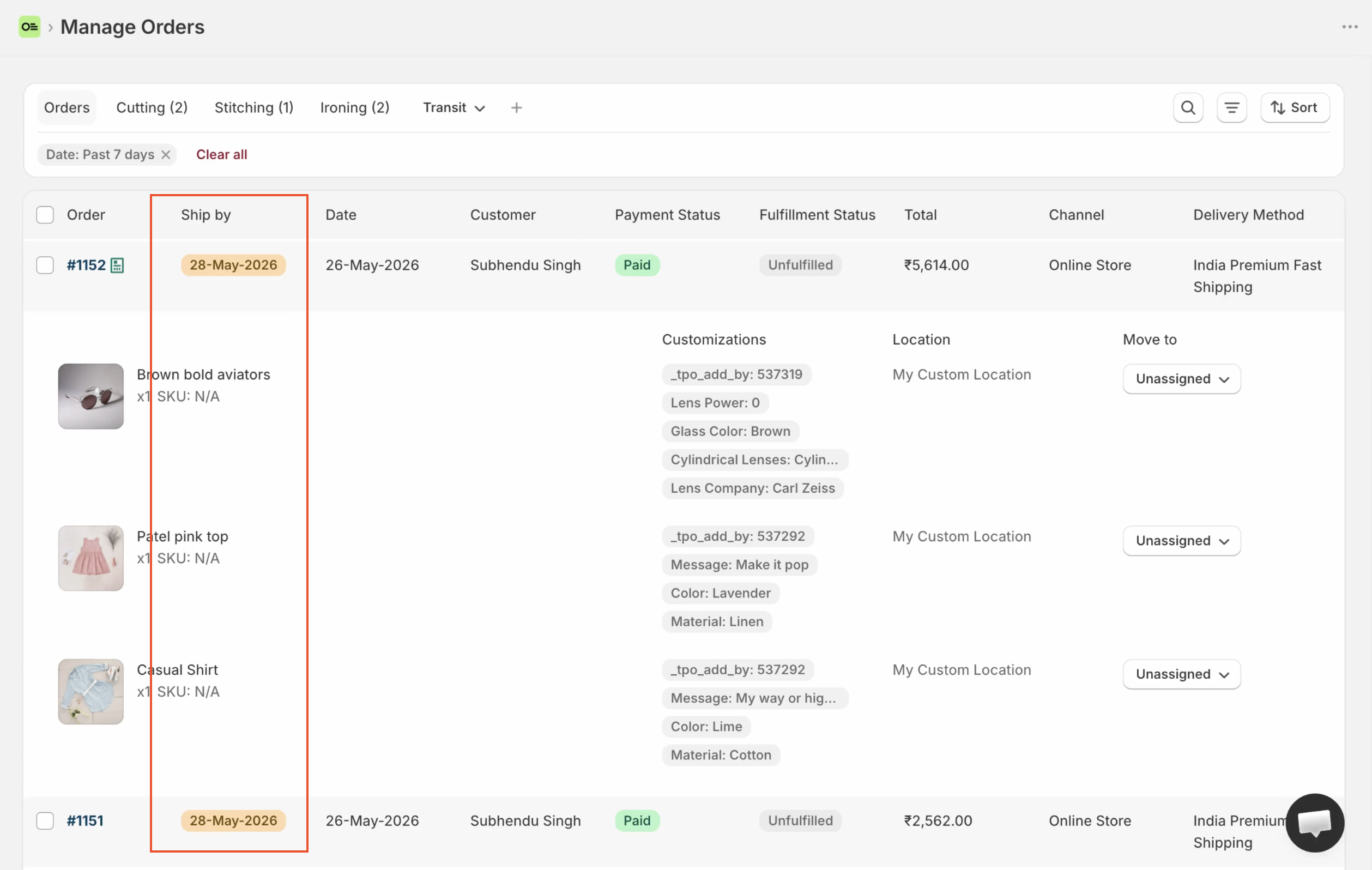
Your team sets priority: first come, first served; shipping-policy promises; or how long each product takes to make. Orderline can set the ship-by date automatically from those rules, or staff can set a date on each order.
Orders can then be filtered and sorted by ship-by, so you can see what is promised when.
Ship-by lives on Orderline’s own board. It is not a column in Shopify Admin Orders, and it is not a checkout delivery-date picker. Setup: ship-by deadlines. Why the date matters: stop missing ship dates.
Where does Orderline fit next to MRP and warehouse OMS?
- If you do not need materials planning, Orderline can handle fulfillment and internal production stages on its own board.
- If you sell on several platforms but sync orders and inventory through Shopify (Shopify as the source of truth), Orderline can filter by channel and fulfill by ship-by. That is ingest, not a warehouse OMS.
- In a combination, MRP owns manufacturing and materials, the OMS owns inventory and catalog sync, and Orderline owns the Shopify fulfillment list (options, ship-by, pack, fulfill). Factory stages live in one of those systems, not two.
For features, see the unified orders view. For prices, see pricing.
Frequently asked questions
Does Shopify have a built-in order management system?
Yes, in the broad sense. Admin Orders, payments, fulfillment, tags, notes, and shipping tools are Shopify’s built-in order management (Order management and fulfillment). That is often enough for stocked products.
Does Shopify have an OMS for made-to-order products?
Not as a production workflow. Native order management handles payment and fulfillment well, but it has no shop-floor stages, no sortable ship-by queue, and no way to see line-item properties without opening each order. Made-to-order shops close that gap with a production queue or a careful tags-and-print setup.
What is the best OMS for Shopify?
There is no single best tool. Match the gap: warehouse and 3PL routing → a warehouse OMS (Cin7, Linnworks, Brightpearl). Materials and recipes → MRP (Katana, Stocksmith, Orderkraft). Seeing customizations and stages on a Shopify list → a production queue such as Orderline. At low volume with simple orders, native Shopify is still the honest answer.
What is the difference between a Shopify OMS and a production queue?
A warehouse OMS optimizes inventory, routing, and multi-node fulfillment. A production queue optimizes “what to make / what is late” for customized lines: stages, ship-by, line-item visibility. If mornings break on stock accuracy, you want the first. If they break on visibility and stages, you want the second.
Is Orderline an OMS?
Orderline is a Shopify order-management app for made-to-order operations — a production queue on its own admin board — not a full warehouse OMS or MRP.
Can I use Orderline with MRP or a warehouse OMS?
Yes, if each system has one job. MRP or OMS owns materials or stock (and factory stages if you use them). Orderline owns the Shopify fulfillment list. Do not maintain the same production stages in two places.
What does Shopify OMS integration mean?
Shopify already is the order system for many shops. “OMS integration” usually means a warehouse or MRP tool connecting to Shopify for orders and inventory. A production queue also sits beside Admin; it does not replace Shopify Orders.
Sources
App Store ratings and plan prices in the tables were checked on 10 September 2026. They change; re-check the listing before you buy. Time estimates for opening orders are a formula from stated assumptions, not a merchant survey.
- Shopify Help, Order management and fulfillment — https://help.shopify.com/en/manual/orders
- Shopify, What is an order management system? (enterprise) — https://www.shopify.com/enterprise/blog/order-management-system-oms
- Shopify App Store listings (10 Sep 2026): Stocksmith, Katana Cloud Inventory, Orderkraft, Cin7 Core, Linnworks, Brightpearl by Sage
- Orderline product and guides — https://orderlinehq.com/guides · pricing · App Store
- Native list gaps — Why Shopify Orders Fail Made-to-Order Sellers